The React Native 'Mixed Bag': Gotchas I Learned the Hard Way

 Debugging in production vs. testing on localhost
If you develop mobile apps with React Native, you’ve likely experienced that moment of euphoria followed by instant frustration: “But it worked in my tests!”
Recently, I implemented a simple URL validation using const parsedURL = new URL(url). My Jest tests (running on Node.js) passed with flying colors. I deployed the app to the device and… crash, or unexpected behavior on Android.
Why? Because the environment where your tests run (Node.js/V8) is not the same execution environment where your app lives (Hermes or JavaScriptCore).
Throughout my career, I’ve compiled a list of “gotchas” where the React Native runtime differs from Node.js, or where iOS and Android fundamentally disagree. I decided to open up this “mixed bag” to save you some debugging time.
1. The JavaScript Runtime Illusion
The first lesson is: Just because it’s JavaScript, doesn’t mean the global objects are identical.
The URL Polyfill
I tried using
new URL('https://site.com')
to check protocols.
- In Jest (Node): It works natively because Node includes the full URL API.
- In React Native: Depending on the engine version (Hermes vs JSC), the global
URLobject might be missing or non-compliant with the WHATWG standard and silently fails. - The Fix: Don’t rely on the engine. Use packages like
react-native-url-polyfillto ensure consistent behavior across all devices or using a regex to get the protocol or path.
The Date Parsing Drama
Android engines are historically stricter (or “fussier”) with date strings than iOS, Android or Node.
- The Error:
new Date("2024-10-10 10:00:00"). - The Result: It works on iOS. On Android, it often returns
Invalid DateorNaNbecause strict ISO-8601 requires aTseparator. - The Fix: Never pass loose strings to the Date constructor. Use libraries like
date-fnsor format the string strictly (YYYY-MM-DDTHH:mm:ss).
// ❌ The Risky Way (works on iOS/Node, fails on some Androids)
const dateString = "2024-10-10 10:00:00";
const date = new Date(dateString); // May result in "Invalid Date" on Android

// ✅ The Safe Way (using date-fns)
import { parseISO } from 'date-fns';
// parseISO handles the missing 'T' and other inconsistencies gracefully
const safeDate = parseISO("2024-10-10 10:00:00");

// ✅ The Native Safe Way (Strict ISO-8601)
const isoDate = new Date("2024-10-10T10:00:00Z"); // Always works
Regex and “Lookbehind”
Writing a fancy Regex using Lookbehind ((?<=...)) works beautifully in Chrome/Node. However, on older iOS versions (JavaScriptCore) or Androids without an updated Hermes engine, this causes an immediate crash on app startup. Avoid it if you support older OS versions.
2. Node.js AND React Native: !Friends
We sometimes forget that Node.js APIs are not part of the JavaScript language specification.
Buffer and Base64
I tried handling a file payload, and the function failed silently on mobile.
- The Reason: The global
Bufferobject is a Node.js specific API. It does not exist in the React Native runtime. - The Fix: Use native-backed libraries like
react-native-blob-utilorexpo-filesystemto handle binaries efficiently.
Crypto
Generating a UUID using crypto.randomUUID() will fail. React Native does not include the Node crypto module by default. You need a polyfill like react-native-get-random-values to bridge this gap.
// 1. Install: npm install react-native-get-random-values uuid

// 2. Import polyfill at the top of index.js
import 'react-native-get-random-values';

// 3. Now libraries that rely on crypto (like 'uuid') will work
import { v4 as uuidv4 } from 'uuid';
const id = uuidv4(); // Works on iOS and Android
3. The Civil War: iOS vs. Android
Even when the JavaScript executes correctly, the underlying native systems behave differently.
The Keyboard Cover-Up
You build a nice login form. The user taps the “Password” field at the bottom of the screen.
- The Result: The keyboard slides up and completely obscures the input field. The user is typing blind.
- The Reason: Unlike web browsers, native apps don’t automatically scroll the focused element into view.
- The Fix: You need the
KeyboardAvoidingViewcomponent. The catch: thebehaviorprop acts differently per platform.- On iOS, you usually need
behavior="padding". - On Android,
behavior="height"works best. - Pro Tip: For complex scrollable forms, the community standard
react-native-keyboard-aware-scroll-viewis often a safer bet than the built-in component.
- On iOS, you usually need
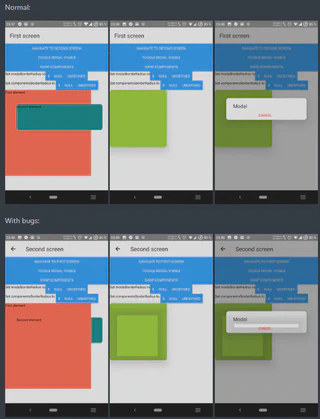
The “Ghost” Shadow Trap
You create a list of cards inside a ScrollView and add shadow props. Suddenly, the shadow bleeds inside the element or applies itself to the text children, making them look blurry or bold.
- The Reason: If a View has
shadowprops (iOS) orelevation(Android) but no explicit background color, the renderer tries to cast a shadow based on the content’s shape (the text and images inside) rather than the container’s bounding box. - The Fix: Always ensure the container with the shadow has a hard
backgroundColordefined (e.g.,backgroundColor: 'white').
Shadows vs. Elevation
- The Reality: Android rendering doesn’t support the Shadow algorithm the same way iOS does. It uses the Material Design concept of
elevation. - The Fix: Create conditional styles (
Platform.select)—useelevationfor Android andshadow*props for iOS.
The localhost Mystery
Running a fetch('http://localhost:3000').
- iOS Simulator: Works fine (it maps to the host Mac).
- Android Emulator: Connection refused.
- The Fix: For the Android emulator,
localhostis the emulated device itself. To access your computer’s server, you must use the loopback IP10.0.2.2.
Alert.prompt
I wanted a native popup asking the user for text input.
- iOS:
Alert.promptopens a system dialog with a text field. - Android: The method is not implemented. It fails silently or does nothing.
- The Fix: On Android, you must build your own custom Modal component with a
TextInput.
Conclusion
Developing in React Native is a constant exercise in balancing three spinning plates: Node.js habits, Apple’s idiosyncrasies, and Google’s rules.
Whenever you implement something involving data parsing (Dates/URLs) or System APIs, be suspicious of your test environment. Testing on a real device is the only way to know the truth.
What about you? What “gotcha” would you add to this list?
